Playlist
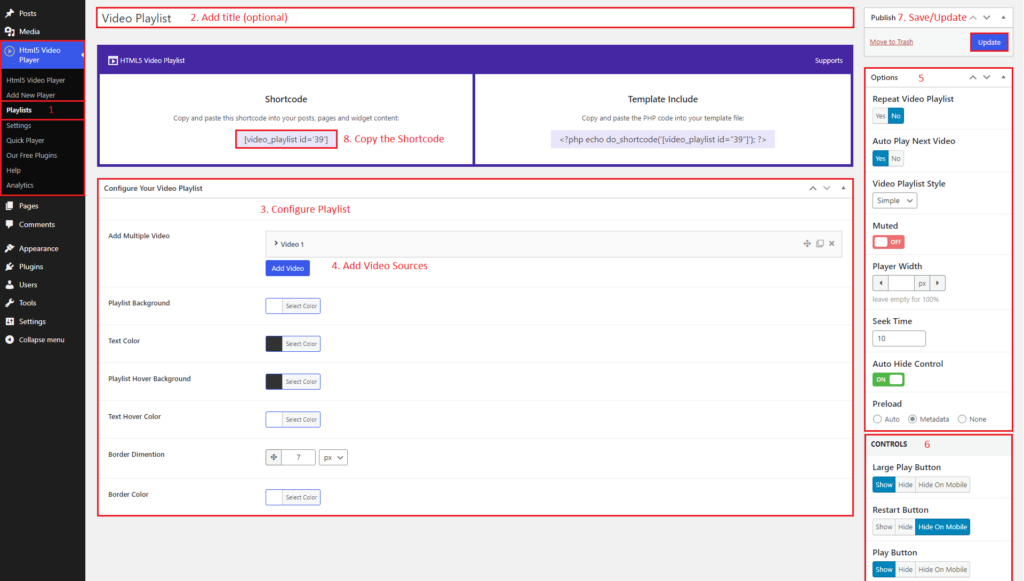
You can create playlists using this plugin. To create a playlist, go to HTML5 Video Player > Playlists. You will see the add new button for the playlist. You can follow these steps:
- Add a playlist by clicking Add New button.
- Give a title for the playlist.
- Configure the playlist, such as Add Multiple Videos, Colors(text and background), Hover Colors(text and background), Border Dimensions, and Border Color.
- Change options from the right sidebar. Configure Repeat Video Playlist, Auto Play Next Video, Video Playlist Style, Muted, Player Width, Seek Time, Auto Hide Control, and Preload from here.
- Also, show/hide the controls for the playlist player from the right sidebar.
HTML5 Video Player- Playlist
Multiple Video Sources
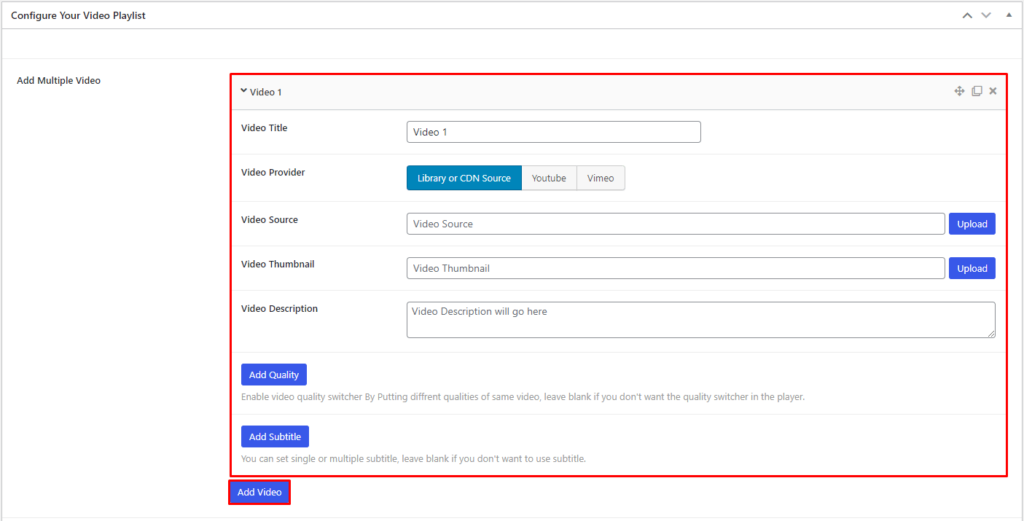
In the In Add Multiple Video option, you can add a video by clicking the Add Video button. There will appear options to add a video to the playlist. Give a video title, choose the provider, add video and thumbnail source, add a description, and also can add quality and subtitles.